Vibe Coding with Claude Code
Hype after hype about how Artificial Intelligence is going to steal everyone’s jobs — is Skynet and the age of the machines finally upon us? Fingers crossed! In the meantime, I tried Claude Code and let myself get swept up in the vibe coding wave.

A new player enters the field
Anthropic just added a new player to the field: Claude Code — I’m terrible at sports metaphors, I know. Let’s explore what it is, how to install it, and whether it’s worth your time.
Who is this Claude, anyway?
Claude Code is a command-line tool developed by Anthropic that lets developers delegate coding tasks directly to Claude from the terminal. It’s essentially an AI coding assistant you can access without leaving your development environment.
Claude lets you:
- Write code based on natural language descriptions;
- Get help with debugging and problem-solving;
- Receive explanations for complex code;
- Automate repetitive programming tasks.
Perfect for a vibe coding session, right?
Installing Claude Code
I’ll assume you’re on macOS or Linux.
On macOS, you can install Claude Code with the following terminal commands:
# Using Homebrew
brew install anthropic/tap/claude-code

# Verifying the installation
claude-code --version
If you don’t have Homebrew installed on macOS, install it with this command:
/bin/bash -c "$(curl -fsSL https://raw.githubusercontent.com/Homebrew/install/HEAD/install.sh)"
On Linux, you can install it using your favorite package manager or directly via curl:
# Debian/Ubuntu-based distros
curl -fsSL https://get.anthropic.com/claude-code/install.sh | sh

# Verifying the installation
claude-code --version
Logging in with your Anthropic account
After installing Claude Code, you’ll need to authenticate with your account:
In the terminal, run:
claude-code login
A browser window will open — log in with your Anthropic account to authenticate Claude Code. After logging in, a confirmation will appear in the terminal.
To check that everything is good with the login, run:
claude-code auth status
(Advanced users will notice that this login creates an API key in your Anthropic account — don’t delete it! You can view it at: https://console.anthropic.com/settings/keys
Time to vibe code!
Vibe coding seems to be the trend of the moment — sitting back and acting like a product owner while an AI generates your code through prompts you picked up from some online course sounds like a pretty magical deal. At least until things get too complex and the AI starts hallucinating.
Either way, it feels like it could work out (or not) — Claude Code uses Claude 3.7 Sonnet, the latest model, which was released in February of this year (2025, in case you’re reading this in 2050 with your bionic eyes).
According to Claude itself:
“Claude 3.7 Sonnet is considered a reasoning model that strikes a good balance between advanced capabilities and response speed for coding tasks.”
Good enough for me.
Some use cases
Go to your application’s root directory and run:
claude-code
This activates the tool. In my case, I asked it to analyze my site, as shown in the image below (click to expand):

As you can see, it returned exactly the tech stack being used:

With a simple prompt, I asked it to reduce the reading progress bar height on the site to 3px. When requesting a code change, Claude Code shows you what will be modified and asks if you accept the changes:

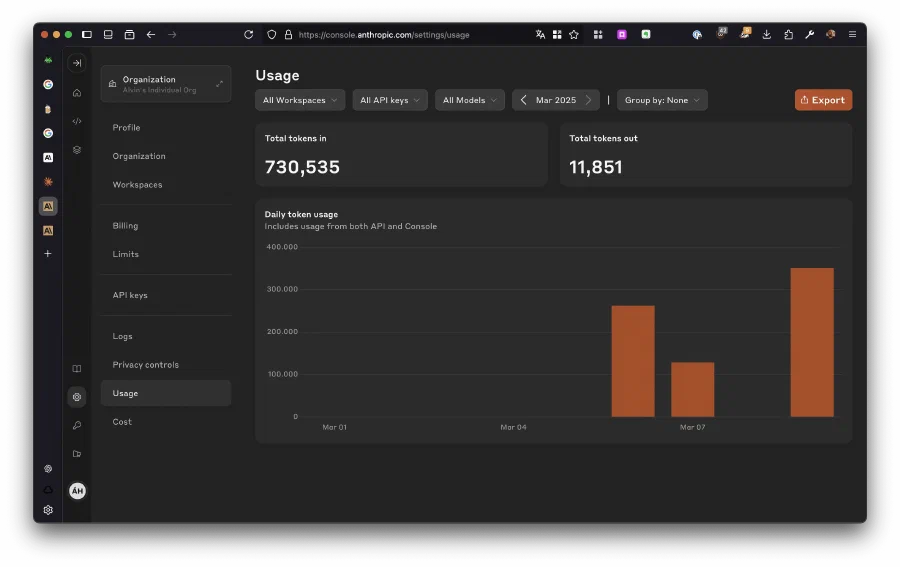
To check your token usage, visit:
https://console.anthropic.com/settings/usage
Conclusion
If you already use Cursor, Visual Studio Code with GitHub Copilot, or Windsurf, you’re probably already comfortable using AI for autocomplete and routine tasks — but I feel like Claude Code can genuinely help people who need a terminal-based tool. A few cases:
1 — Avoiding context switching when making changes to your codebase directly from the terminal; 2 — Being a CLI tool, it can be easily integrated into scripts, pipelines, and automation workflows;
3 — You really love doing everything from the terminal (my case).
(っ´ω`c)♡ The cover image for this post was generated with Google Gemini .
